 Travada Systems
Recurring trips create a pending trip on each scheduled day, filled in from the template. A pending trip doesn't count in reports until it's confirmed, so confirming is how each run becomes a real trip with the day's real figures.
When trips are waiting, a banner on the Expenditure page and the dashboard tells you how many, and a count shows next to Expenditure in the sidebar.
Confirm one trip
Open the pending trip's ⋯ menu in the trips table:
- Confirm trip opens it on the Review step. Correct the day's actuals (fuel, detention, repairs) and click Confirm trip.
- Confirm as-is confirms it with the template's amounts, when nothing was different.
- Discard trip deletes this run only. The series carries on.
Confirm many at once
Click Review on the banner to open Review pending trips. It lists every pending trip, with tabs to show one month at a time.
- 1
Correct amounts in place
Click any amount (rate, detention, fuel, clerk fee, mileage or parking) and type the real figure. Enter and the arrow keys move between rows, like a spreadsheet.
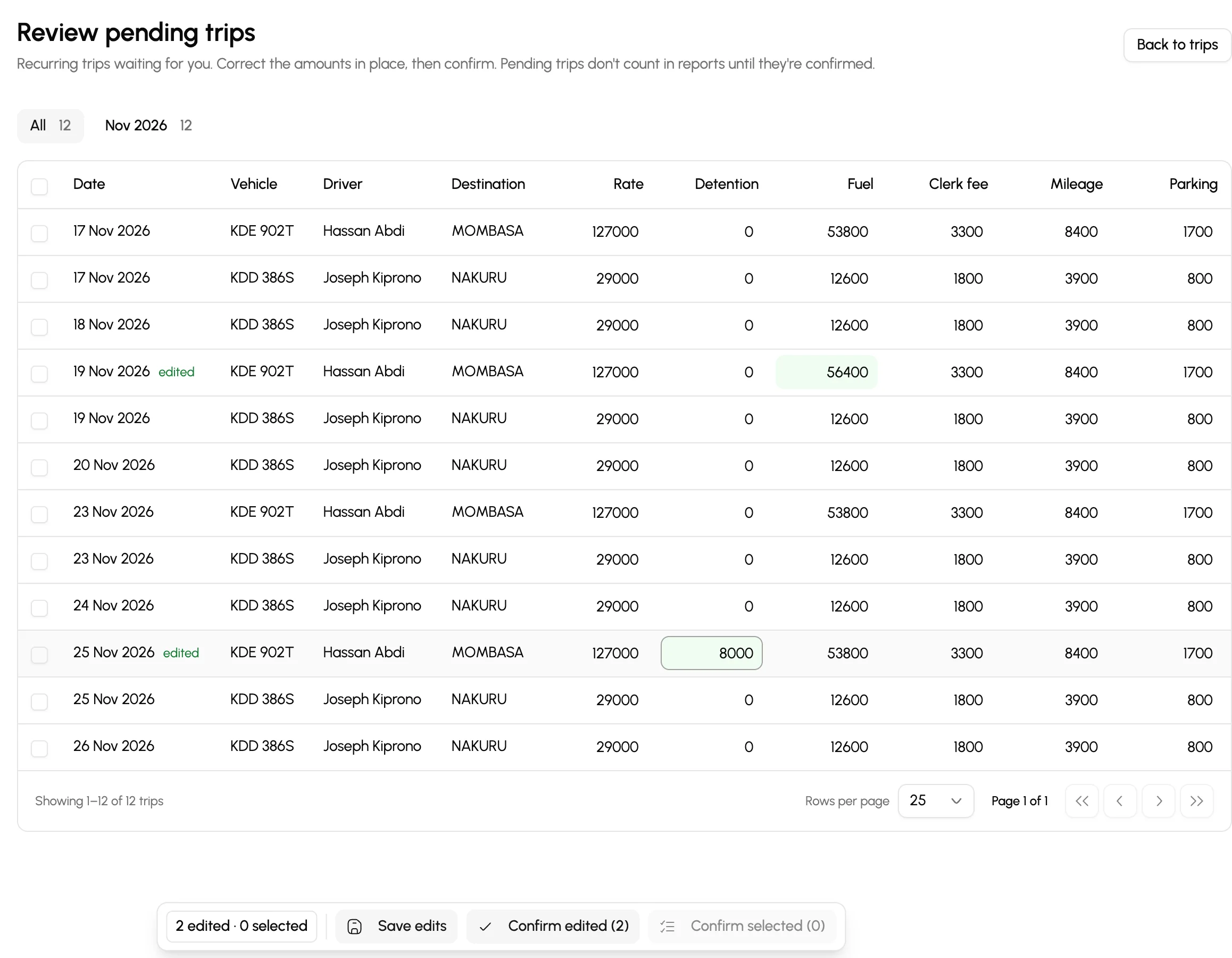
- 2
Save or confirm
- Save edits keeps your corrections without confirming yet.
- Confirm edited confirms the trips you changed.
- Confirm selected confirms the rows you've ticked.