 Travada Systems
Everyone who records trips or reads the numbers can have their own login to your company account. Users are free: you pay per active truck, not per person.
Invite someone
- 1
Open Team settings
Go to Settings → Team. You'll see everyone in the company and any invitations still waiting.
- 2
Send the invitation
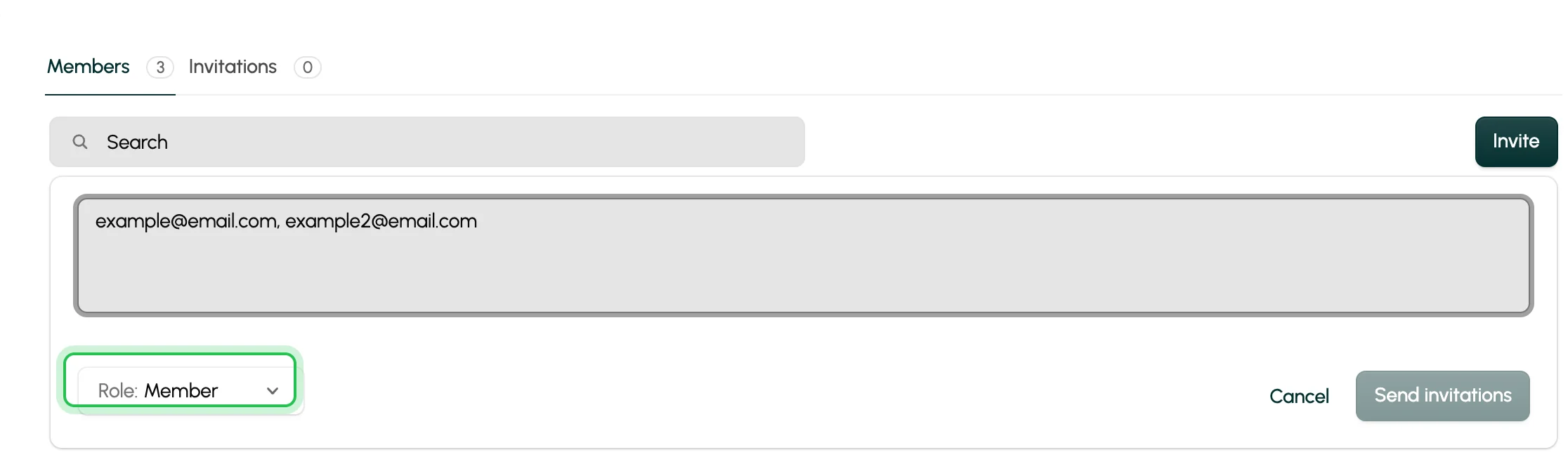
Click Invite, enter one or more email addresses separated by commas, choose a Role (Member is the default), and click Send invitations. Each person gets an email with a link to join.
- 3
They join
Once they accept, they sign in and land in your company's account, with your trucks, drivers and trips.
Admins and members
| Admin | Member | |
|---|---|---|
| Record, edit and confirm trips | Yes | Yes |
| Vehicles, drivers, income and expenses | Yes | Yes |
| Company details and currency | Yes | View only |
| Billing and invoices | Yes | View only |
| Invite people and change roles | Yes | No |
Give admin to the owner and whoever handles billing. Everyone else can be a member.