 Travada Systems
Many fleets get a discount per litre from their fuel station, often paid back later or settled on account. Travada records it against the trip, so you can see both what fuel cost at the pump and what you saved.
How it's worked out
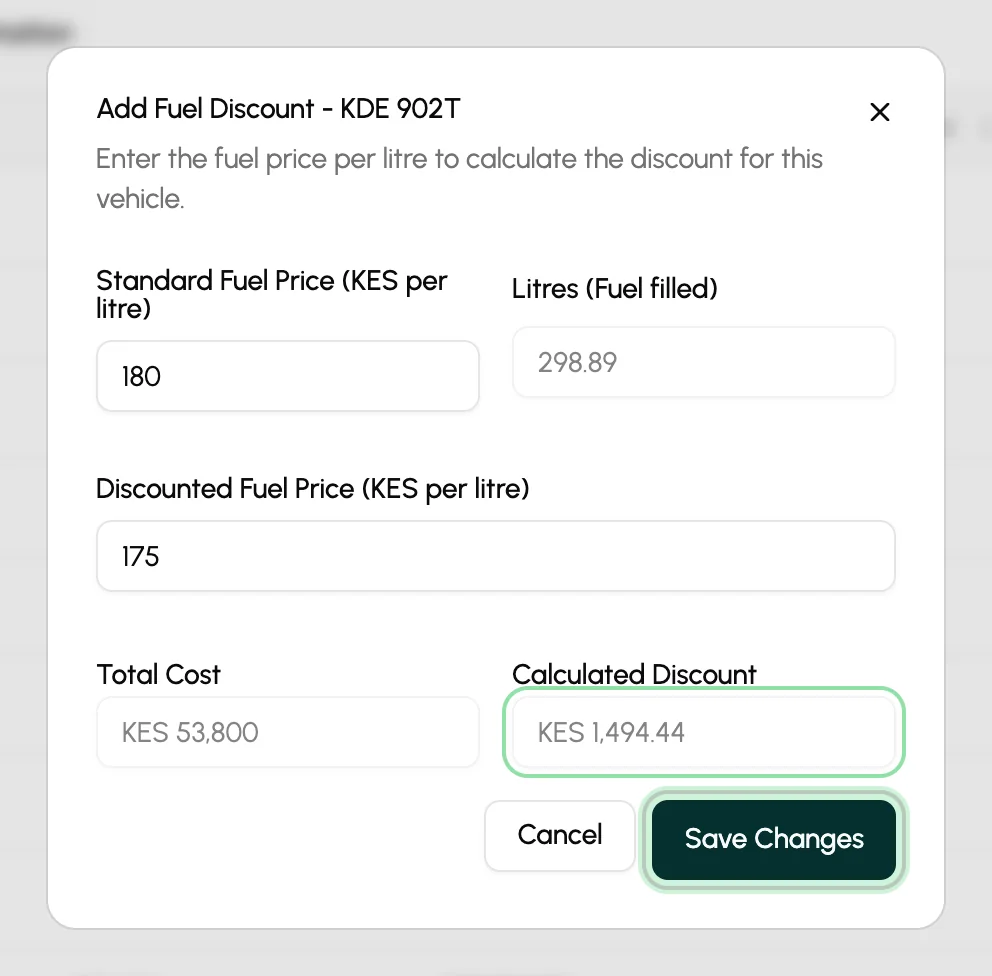
You enter two prices per litre: the standard pump price, and the discounted price you actually pay. Travada works out the litres from the trip's fuel cost and the standard price, then:
discount = litres × (standard price − discounted price)
For example, a trip with KES 53,800 of fuel at a standard KES 180 a litre is about 298.9 litres. At a discounted KES 175, the discount is 298.9 × 5 ≈ KES 1,494.
Add a discount to one trip
- 1
Open the trip on the Fuel page
Go to Expenses → Fuel, find the trip, open its ⋯ menu and choose Add fuel discount.
- 2
Enter the prices
Enter the Standard Fuel Price and the Discounted Fuel Price, both per litre.
- 3
Calculate and save
Click Calculate Discount. Travada shows the litres and the discount. If it looks right, click Save Changes.
The discount appears in the Fuel Discount column, and the total for the month at the top of the page.
Change or remove a discount
To change one, add it again with the new prices; the new discount replaces the old one. To remove it, open the trip's ⋯ menu and choose Delete fuel discount, or tick it and choose Remove discount in the bar that appears at the bottom.